Monday, 22 September 2014

How to add jar files in eclipse ?

Most of the beginners face the issue of adding jar/libraries to existing project or a new project.
Below are some basic steps with snapshots which will explain the rest of the steps.

1) Right click on the project name.


2) Either click on "Properties" or "BuildPath". I clicked on Properties.


3) Click on Java Build Path as mentioned in the above snapshot. Click on Add External jars after that.
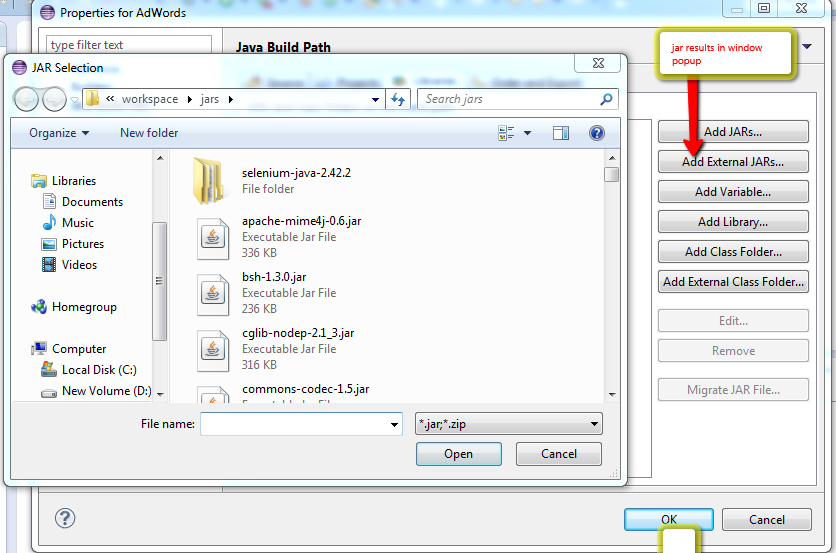


4) Select the jar file and click on open button .


5) The selected jar is added and shown in the row . Click on OK button to save the result.


Sunday, 21 September 2014

Reading data from excel using Apache POI

Below are the two methods which are used to read data from excel file and write data back to excel file.
 import java.io.File;  
 import java.io.FileInputStream;  
 import java.io.FileOutputStream;  
 import java.io.IOException;  
 import java.util.Iterator;  
 import java.util.List;  
 import java.util.Set;  
 import org.apache.poi.hssf.usermodel.HSSFCell;  
 import org.apache.poi.hssf.usermodel.HSSFRow;  
 import org.apache.poi.hssf.usermodel.HSSFSheet;  
 import org.apache.poi.hssf.usermodel.HSSFWorkbook;  
 import org.apache.poi.openxml4j.exceptions.InvalidFormatException;  
 import org.apache.poi.ss.usermodel.Row.MissingCellPolicy;  
 import org.apache.poi.ss.usermodel.WorkbookFactory;  
 import org.eclipse.jdt.internal.compiler.lookup.UpdatedMethodBinding;  
 // Reading data from excel  
 public static void excelRead(String sPath,String sheetName) throws IOException //sPath-- path where excel is placed , sheetName--The sheet which you want to read  
      {  
           File xlFile= new File(sPath);  
           FileInputStream fin = new FileInputStream(xlFile);  
           HSSFWorkbook wBook= new HSSFWorkbook(fin);  
           HSSFSheet sheetObj=wBook.getSheet(sheetName);  
           MissingCellPolicy mcpObj= HSSFRow.CREATE_NULL_AS_BLANK; //Missing Cell Policy  
           HSSFRow rowObj;  
           HSSFCell cellObj;  
            xRows= sheetObj.getLastRowNum()+1;  
            xCols= sheetObj.getRow(0).getLastCellNum();  
            xData= new String[xRows][xCols];  
           System.out.println("No of rows are "+xRows +" No of Cols are "+xCols);  
           for (int i=0;i<xRows;i++)  
           {  
                //System.out.println("inside loop");  
                rowObj=sheetObj.getRow(i);  
                     for (int j=0;j<xCols;j++)  
                     {  
                          cellObj=rowObj.getCell(j, mcpObj);  
                           String Value=cellToString(cellObj);  
                          //System.out.print(Value+"@@@@");  
                          xData[i][j]=Value;  
                     }  
                //System.out.println("----------------------------------------------------------------");  
           }  
      }  
      public static String cellToString(HSSFCell cell)  
      {  
           int type=cell.getCellType();  
           Object result;  
           switch(type)  
           {  
                case HSSFCell.CELL_TYPE_NUMERIC ://0  
                     //result=cell.getNumericCellValue();-----original  
                     cell.setCellType(HSSFCell.CELL_TYPE_STRING);  
                     result=cell.getStringCellValue();  
                     break;  
                case HSSFCell.CELL_TYPE_STRING: //1  
                     result=cell.getStringCellValue();  
                     break;  
                case HSSFCell.CELL_TYPE_FORMULA: //2  
                     throw new RuntimeException("We can't evluate Formula in java");  
                case HSSFCell.CELL_TYPE_BLANK: //3  
                     result="";  
                     break;  
                case HSSFCell.CELL_TYPE_BOOLEAN: //4  
                     result=cell.getBooleanCellValue();  
                     break;  
                case HSSFCell.CELL_TYPE_ERROR: //4  
                     throw new RuntimeException("This cell has an error");  
                default:  
                     throw new RuntimeException("We had not yet handled this type "+type);  
           }  
           return result.toString().trim();  
           }  
 // Write data back to excel  
      public static void excelWrite(String sPath , String SheetName,String xlData[][] ,int xRows,int xCols) throws IOException  
      {  
           System.out.println("in write Excel");  
           File outXlFile= new File(sPath);  
           HSSFSheet outSheet=null;  
                HSSFWorkbook outBook= null;  
                 if (outXlFile.exists()) {  
                    try {  
                      outBook = (HSSFWorkbook)WorkbookFactory.create(outXlFile);  // If the sheet already exists then this method re-writes the sheet
                    } catch (InvalidFormatException e) {  
                      e.printStackTrace();  
                    }  
                    outSheet = outBook.createSheet(SheetName);  
                  }  
                  else{  
                    outBook = new HSSFWorkbook();  
                    outSheet = outBook.createSheet(SheetName);  
                  }  
                //HSSFSheet outSheet= outBook.createSheet(SheetName);  
                System.out.println("Rows "+xRows+" Cols "+xCols);  
                for (int i=0;i<xRows;i++)  
                {  
                     HSSFRow outRow= outSheet.createRow(i);  
                     for(int j=0;j<xCols;j++)  
                     {  
                          HSSFCell outCell= outRow.createCell(j);  
                          outCell.setCellType(outCell.CELL_TYPE_STRING);  
                          outCell.setCellValue(xlData[i][j]);  
                     }  
                }  
                FileOutputStream fout=new FileOutputStream(outXlFile);  
                outBook.write(fout);  
                fout.flush();  
                fout.close();  
                outBook=new HSSFWorkbook(new FileInputStream(sPath));  
      }  

Wednesday, 17 September 2014

Missing Cell Policy -- Why and how to use it ?


When we read data from excel file using selenium code, most of the people face null
pointers exception if they leave any field blank or null accidentally.
Beginners are the one who face this problem frequently . To avoid this
problem Apache POI comes up with a solution i.e. Missing cell policy.
You can apply this policy on row object . There are 3 basic policies 

CREATE_NULL_AS_BLANK
RETURN_NULL_AND_BLANK
RETURN_BLANK_AS_NULL
You can choose the appropriate policy as suited to your demands.
Below is the code that shows implementation of the same :-
This code is to read data from an excel file and store the input in 2 dimensional arrays.

 
public static void excelRead(String sPath,String sheetName) throws IOException //spath -- Path to excel file , sheetName-- The sheet you want to read  
      {  
           System.out.println("In excelRead method");  
           File xlFile= new File(sPath);  
           FileInputStream fin = new FileInputStream(xlFile);  
           HSSFWorkbook wBook= new HSSFWorkbook(fin);  
           HSSFSheet sheetObj=wBook.getSheet(sheetName);  
           MissingCellPolicy mcpObj= HSSFRow.CREATE_NULL_AS_BLANK; //Missing cell policy applied here  
           HSSFRow rowObj;  
           HSSFCell cellObj;  
            xRows= sheetObj.getLastRowNum()+1;  
            xCols= sheetObj.getRow(0).getLastCellNum();  
            xData= new String[xRows][xCols]; // two dimensional array  
           System.out.println("No of rows are "+xRows +" No of Cols are "+xCols);  
           for (int i=0;i<xRows;i++)  
           {  
                //System.out.println("inside loop");  
                rowObj=sheetObj.getRow(i);  
                     for (int j=0;j<xCols;j++)  
                     {  
                          cellObj=rowObj.getCell(j, mcpObj);// policy object applied here   
                           String Value=(cellObj.getStringCellValue());  
                          xData[i][j]=Value;  
                     }  
           }